CrossHat: A Display Font for Bold Web Design
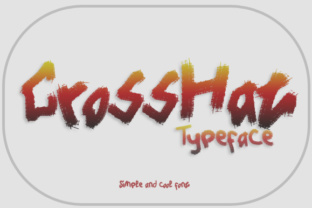
CrossHat is a display font that brings a unique visual personality to digital projects. Designed by Gblack Id, this typeface features clean lines and basic punctuation, making it versatile for both creative and functional use in web design. As a web designer, I’ve found CrossHat to be an excellent choice for projects that require a strong typographic presence without sacrificing readability.
Visual Personality and Style
CrossHat stands out with its modern, geometric structure. The font has a minimalist yet bold aesthetic that works well in both digital and print environments. Its clean punctuation and consistent stroke widths make it highly legible even at smaller sizes. This makes it ideal for headers, titles, and other prominent text elements where clarity and impact are equally important.
Applying CrossHat in Web Design
As a display font, CrossHat is best suited for headlines, hero sections, and call-to-action buttons. Its strong visual identity can help reinforce brand tone and create a memorable user experience. For instance, on a creative portfolio site, using CrossHat as the primary heading font can immediately communicate a sense of professionalism and modernity.
In online stores, CrossHat can be used for product banners or promotional text to draw attention without overwhelming the user. On landing pages, it’s effective for short, impactful phrases like “Limited Time Offer” or “Join Now.” When paired with a complementary sans serif font for body copy, CrossHat adds visual rhythm and hierarchy to the layout.
Readability and Layout Rhythm
Readability is key in any web design project, and CrossHat excels in this area. Its clear letterforms and balanced spacing allow for easy scanning, which is crucial for conversion-focused layouts. Whether it's a blog header or a course sales page, CrossHat maintains legibility across different screen sizes and device orientations.
For mobile users, it’s important to ensure that fonts like CrossHat perform well on smaller screens. Testing CrossHat against dark and light backgrounds, image overlays, and small buttons can help maintain its impact without compromising readability. In responsive designs, using CrossHat for section headings and decorative accents ensures a cohesive visual flow while keeping the content accessible.
Font Pairing and Brand Identity
When considering font pairing, CrossHat pairs well with simple sans serif fonts for body text. This contrast helps guide the user’s eye from the headline to the supporting content. For example, using CrossHat for a hero title and a clean sans serif like Montserrat for paragraphs creates a balanced and professional look.
If you're designing for editorial or packaging purposes, pairing CrossHat with a serif font can add a touch of elegance. However, for more modern and digital applications, sticking to a sans serif body font will keep the design feeling fresh and contemporary. CrossHat’s versatility makes it a great addition to any brand kit, whether you're building a website, social media graphics, or digital templates.
Technical Considerations
Before implementing CrossHat in your projects, it's important to check the included styles, file formats, and webfont availability. Ensuring that CrossHat supports the necessary weights and alternates will give you more flexibility in your design choices. Additionally, verifying multilingual support is essential if your target audience includes non-English speakers.
For commercial use, always confirm the licensing terms for CrossHat. Whether you're working on a client project, an online store, or a digital template, having the correct license ensures that your work remains compliant and professional. CrossHat’s commercial font status makes it suitable for a wide range of applications, from personal websites to enterprise-level branding.
Practical Use Cases
- Creative Portfolio Site: Use CrossHat for headers and project titles to emphasize creativity and originality.
- Boutique Online Store: Apply CrossHat to product banners and promotional text to stand out in a competitive market.
- Coaching Website: Employ CrossHat for headline sections and CTA buttons to encourage user engagement.
- Course Sales Page: Highlight key selling points with CrossHat to capture attention quickly.
- Blog Header: Use CrossHat to create a strong first impression and set the tone for your content.
- Digital Brand Kit: Incorporate CrossHat into your brand assets for consistency across all platforms.
By integrating CrossHat into your design workflow, you can enhance the visual appeal and functionality of your digital projects. Its clean design, strong personality, and adaptability make it a valuable asset for web designers and digital creators looking to build impactful, readable, and visually engaging experiences.